A coach that talks to you mid-game
It knows this match, your past games and you as a player. Hold Alt+V and ask out loud.

This match
Gold, items and backpack, level, deaths, buyback, game clock. Enemy heroes from the screen if you turn it on.
Game State IntegrationYour past matches
Your recent games on this hero, what the replay review found, your item timings in wins.
your Highground reviewsYou as a player
Mistakes that repeat from game to game. The coach brings them up when they fit the moment.
repeats across all reviews
This is how it looks over Dota
- 1Mini panelYour GPM against your norm on the hero and the next key item: how much is missing and when you'll have it.
- 2Side tipShows up only when there's something to say, at most once a minute, and fades after eight seconds.
- 3Dota HUD stays clearBlocks sit in empty corners, you place them yourself with Alt+L. Alt+H hides the whole overlay.
Tips in game. Answers after
Four moments from one match: what Live said while the game was on, and what the replay review explained afterwards.
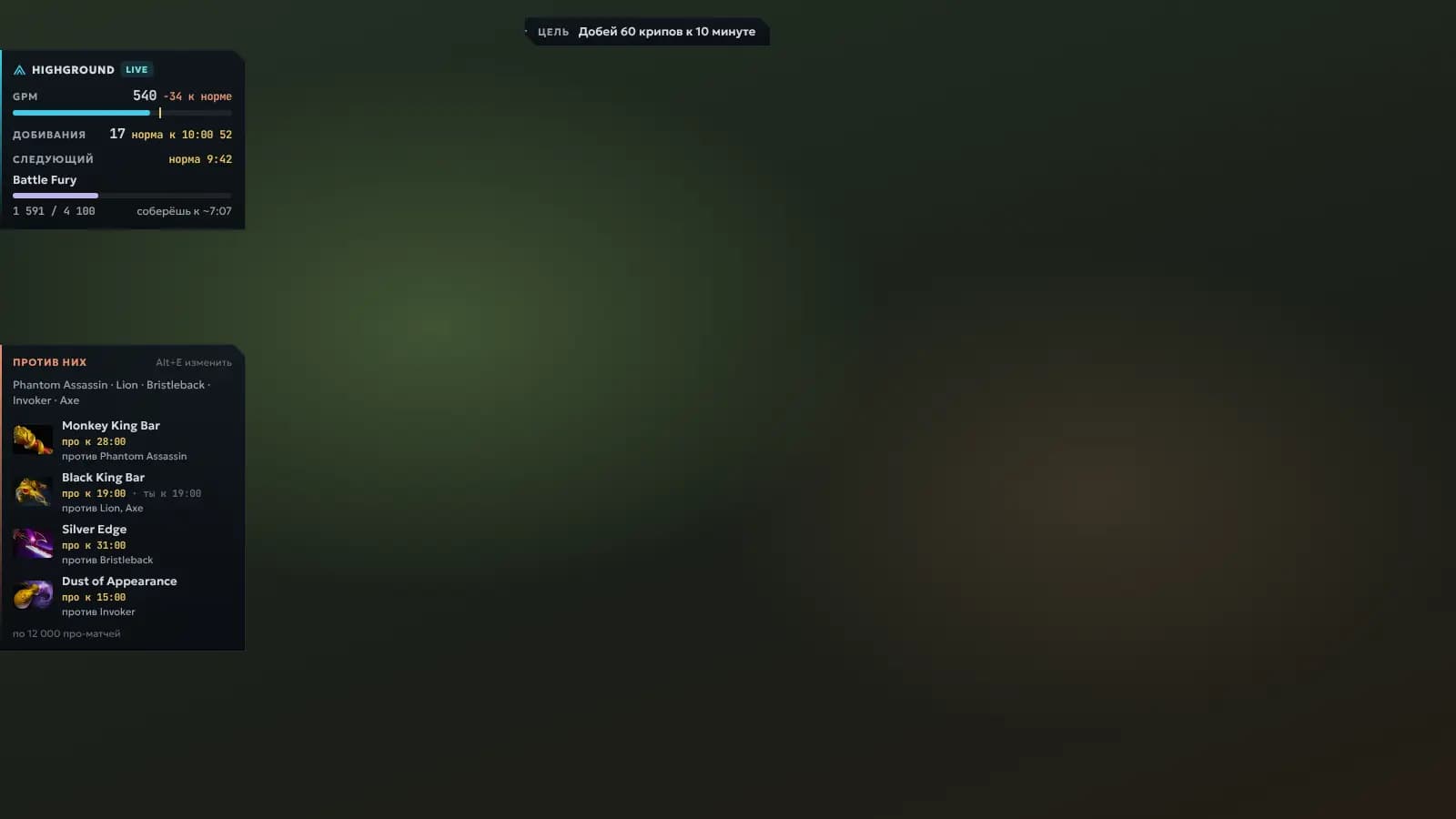
You know what to build before the horn
«Against Phantom Assassin, pro Juggernauts buy Monkey King Bar, usually by minute 28.»
«You bought Monkey King Bar at minute 35, seven minutes later than pros. Before that, Phantom Assassin won two fights for them.»
1 of 4 · Enemies come from Alt+E or from the screen (beta). The “Against them” card lists items for your hero against their lineup and when pros buy them.
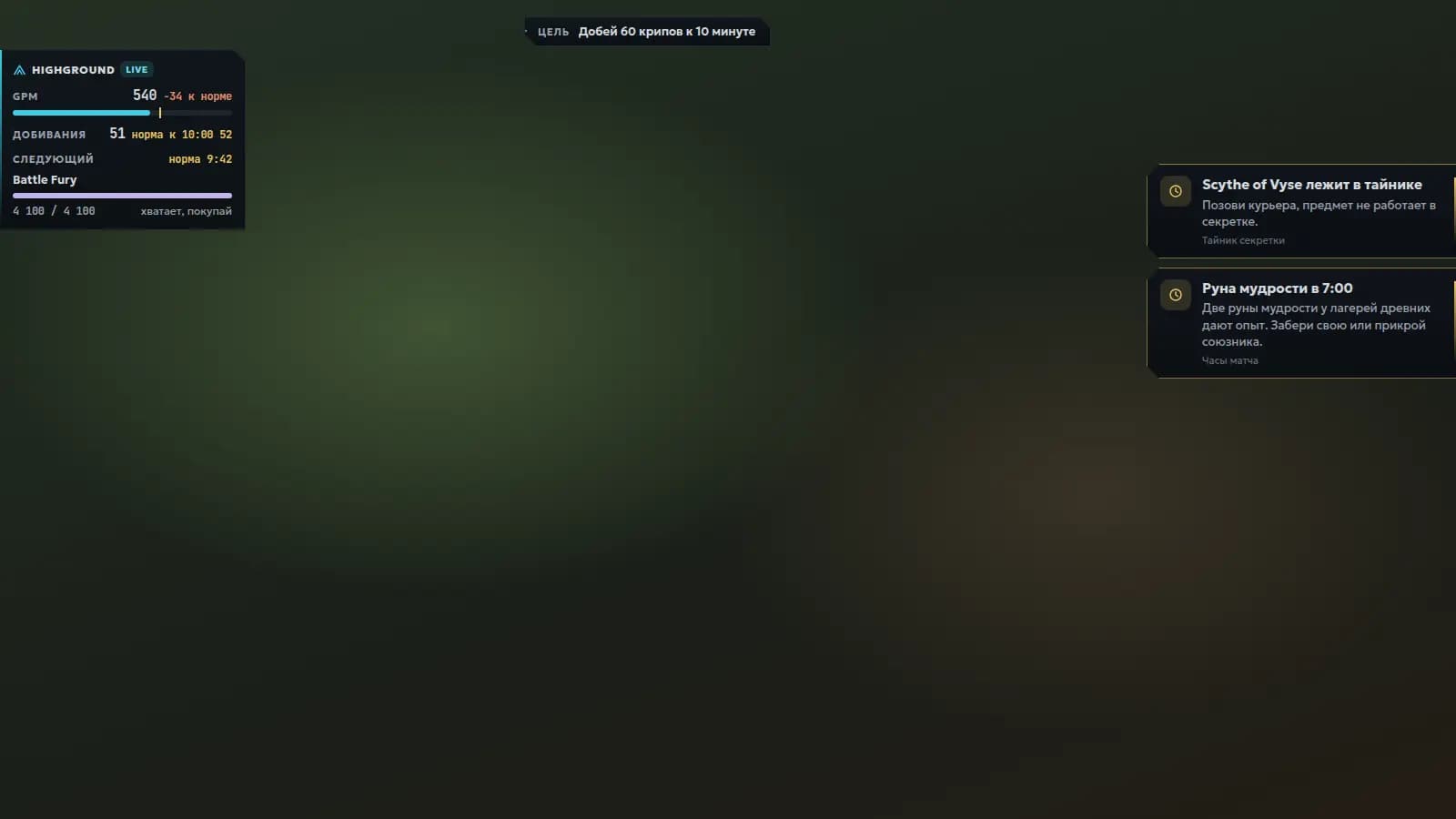
Tells you when to buy
«You can afford Battle Fury. Your norm is 9:42. Buy it now: the courier brings it while you farm.»
«Battle Fury at 9:20, 22 seconds ahead of your norm. In games where you made it this early, you won more often.»
2 of 4 · The mini panel compares your farm with your own wins on the hero. Once you can afford the item, it says so.
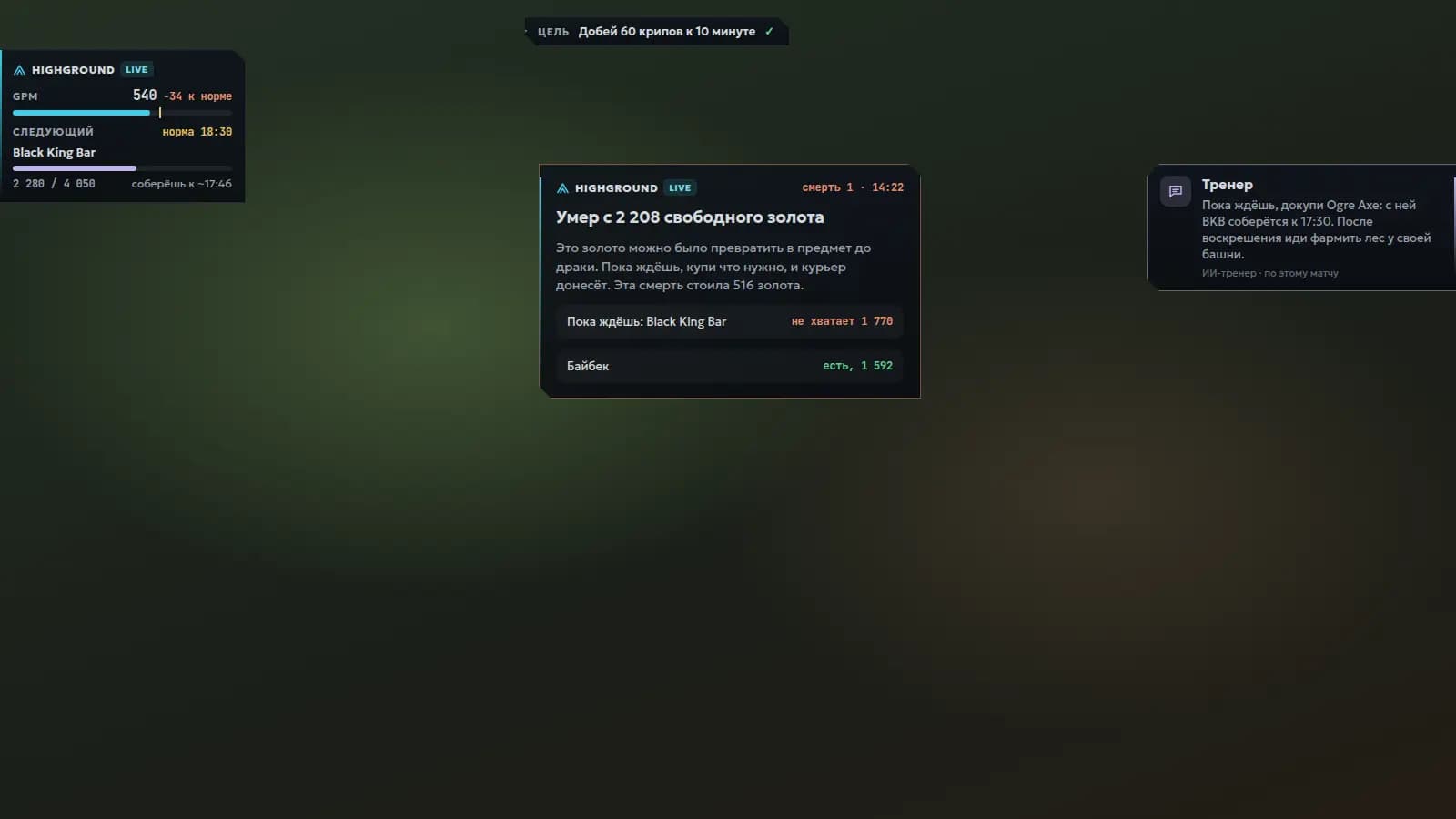
Tells you what to do while you're dead
«Died with 2,208 unspent gold. While you wait, buy Ogre Axe: BKB will be ready by 17:30.»
«14:22: you walked onto their side without BKB or a ward. Three enemies had been missing from the map for 20 seconds. That was the gank.»
3 of 4 · The screen goes grey, a card in the middle: how much gold you lost, what to buy before respawn, whether buyback is ready.
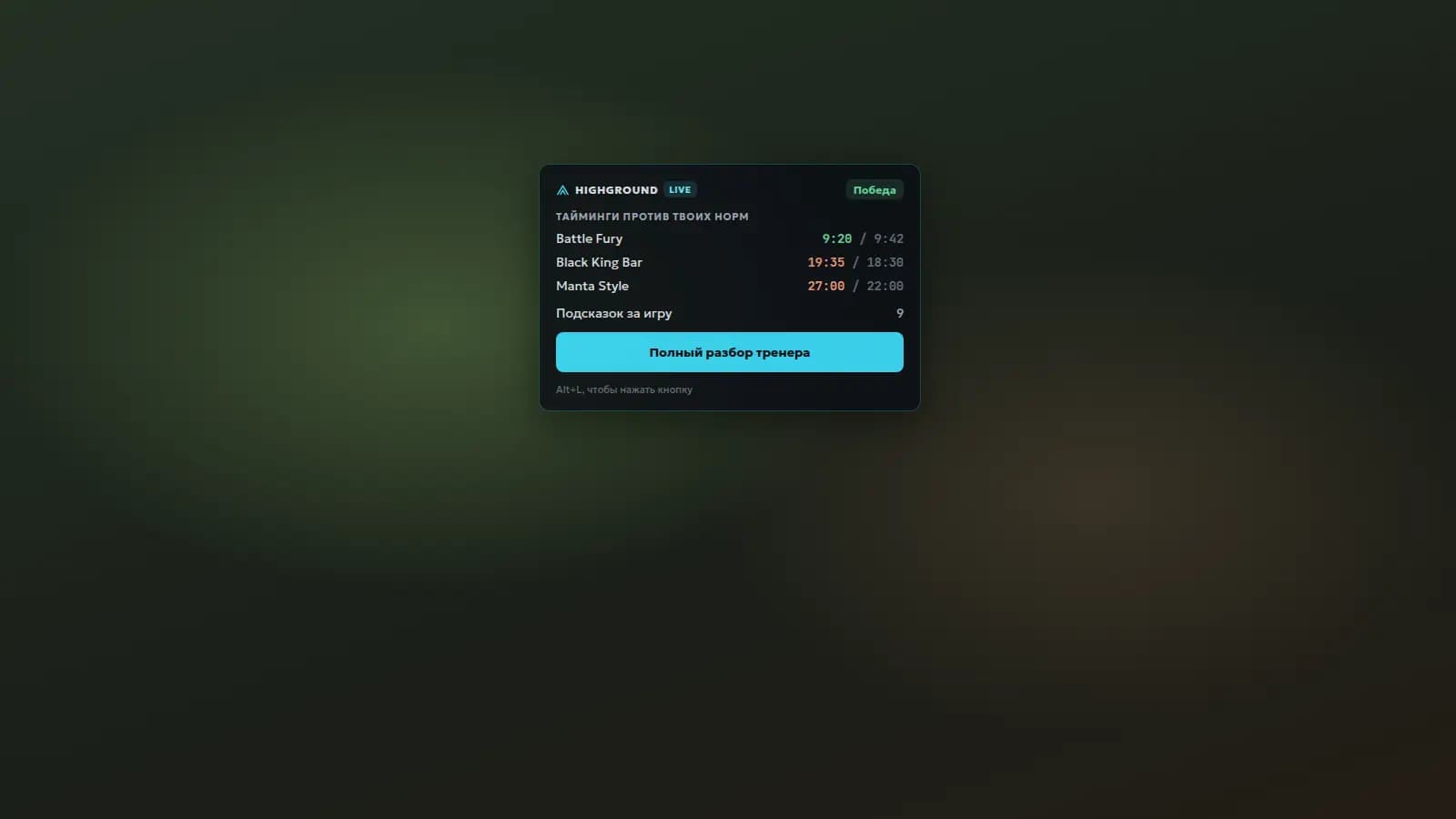
Explains what to fix next game
«Battle Fury ahead of your norm, Black King Bar and Manta Style behind. The full review is one button away.»
«Two of your three deaths came with gold in your pocket. Goal for the next game: spend gold before fights and get BKB by 18:30.»
4 of 4 · The match is over: Live shows your timings against your norms, and the coach is already reviewing the replay.
Hold Alt+V and talk
The orb in the corner shows whether the coach is listening, thinking or speaking. The first two sentences of an answer are read out, the full answer stays on screen. The coach speaks up on its own about what matters: dying with gold, BKB in the backpack, Roshan.
Voice questions and spoken answers come with the Subscription with voice. Pricing →
How the coach soundsThe recorded voice speaks Russian for now.
What else Live does
- Coach without a subscriptionAsk the coach with Alt+Q right in the match. Your first 3 games are free, then 1 a day.
- Invite a friendWhen your friend plays their first game with the coach, you get 7 days of the coach in every game and they get 3 extra games. The link is in your profile.
- Coach voiceA recorded voice instead of the Windows one: 177 short phrases about gold, deaths, backpack, runes and Roshan. Volume and “important only” in settings.
- Settings in tabsTips, coach and voice, screen, stream and OBS. Every tip can be turned off on its own.
- Stream overlayThe same blocks on your stream: turn it on in the app and add the page to OBS as a Browser source. The background is transparent.
- Enemies from the screenbetaLive recognises enemy heroes in Dota's top bar and fills in “Against them” itself. Turn it on in settings; frames never leave your computer.
Only what you already see
Valve's official channel
Data comes through Game State Integration: Dota itself sends it to a program on your computer. Valve built this for third-party apps.
The game is untouched
The overlay is a separate transparent window over Dota. It doesn't read memory or hook into the game process. If you turn on enemies from the screen, the screen is captured from outside, like OBS does.
Microphone on a key
The microphone records only while you hold Alt+V, for 15 seconds at most. We need the recording to recognise the question, and we keep neither it nor the text in logs.
Nothing hidden
The game doesn't give a player enemy data, and we don't dig for it. Everything the overlay sees is already on your screen.
Getting started
- 01
Install
Download the Windows installer. The app puts the Dota config in place itself.
- 02
Set up Dota
Borderless window display mode and the -gamestateintegration launch option.
- 03
Play
Alt+V to ask by voice, Alt+Q to type, Alt+H to hide the overlay. After the match, the full coach review.
FAQ
- Can I get banned for this?
- The overlay only uses Game State Integration, Valve's official mechanism for third-party programs. It doesn't read game memory or inject anything into it.
- Does it show where enemies are?
- Where enemies are on the map, no: the game doesn't send that, and we don't dig for it. Which heroes the enemies picked, Live can recognise from the screen, from Dota's top bar, to suggest items against them. It's a beta, off by default, and frames never leave your computer.
- Do I need Overwolf?
- No. It's a standalone app with an installer of about 10 MB. The window draws over Dota in borderless window mode.
- Does it work on Mac or Linux?
- Windows 10 and 11 only for now.
- Where do the norms come from?
- From your reviewed matches on Highground: median timings and GPM in your wins on that hero.
- Do I need a microphone?
- Only for voice questions. Without one, type with Alt+Q; answers and tips are still read out loud.
- What language does the coach speak?
- Russian for now: the app, the tips and the voice are in Russian.
- How much does it cost?
- Tips and the text coach work without a subscription: your first three games are free, then one a day. Voice questions and spoken answers come with the Subscription with voice; prices are on the pricing page.